Server-side Mac gateway
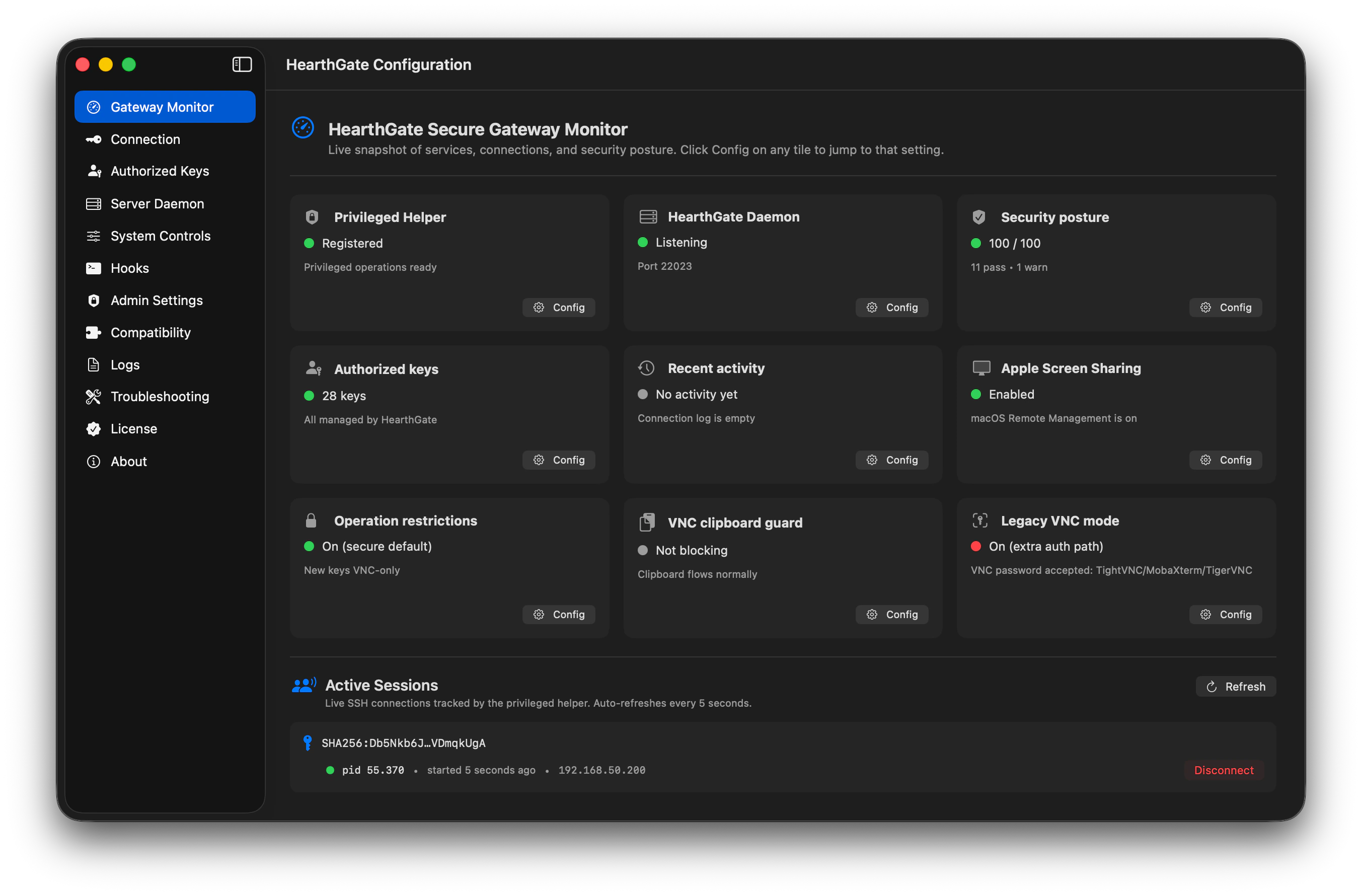
HearthGate runs where the access risk lives: on the Mac being reached. It manages Screen Sharing, Remote Login, keys, ports, packages, logs, and revocation from one native app.
Turn your Mac into a secure VNC-over-SSH gateway.
The missing Mac-side server layer for people who need real SSH security, cross-platform VNC access, full legacy VNC client support, restricted keys, session visibility, and one-click connection packages.
Start your full-featured 30-day trial today.
Why it matters
macOS has Screen Sharing and OpenSSH, but secure access still takes expert manual work. HearthGate turns that stack into a native Mac gateway, then adds the operational layer admins expect: service controls, process visibility, live logs, and automated scripts for connect and disconnect events.
HearthGate runs where the access risk lives: on the Mac being reached. It manages Screen Sharing, Remote Login, keys, ports, packages, logs, and revocation from one native app.
Sessions travel through SSH. New keys can be limited to VNC tunneling only, with no shell, no SCP/SFTP, no arbitrary port forwarding, and no agent forwarding.
HearthGate has been tested with RealVNC, Remmina, MobaXterm, TightVNC, TigerVNC, PuTTY, AVNC, and Screens.
Create native scripts and settings for connections from FreeBSD, Linux, Android, iOS, macOS, and Windows.
Use the viewer or SSH client that fits the device in front of you, while HearthGate keeps the Mac side gated and controlled.
Inspect Mac services, processes, and live system logs; then start, stop, restart, enable, or disable services during the remote session.
Run scripts when a tunnel connects or disconnects, with delayed execution, timeout safeguards, and loop protection built in.
New in 1.4.0
HearthGate 1.4 gives you one-click Disconnect all from the menubar, a smarter Quit dialog for active remote sessions, clearer disconnect notifications, and stronger cleanup across edge cases.
See what's new in 1.4End every live remote session from the menubar in under a second when something looks off or you simply want everyone out.
If remote sessions are active, HearthGate asks whether to Disconnect & Quit, Cancel, or Quit anyway before the app closes.
Viewer disconnect notifications now arrive before the SSH session-ended notice, matching the actual session timeline.
Extra safety coverage catches sessions that might slip past app tracking, so disconnect actions behave consistently.
Watch failed SSH attempts and temporarily block noisy source IPs before they keep hammering the Mac.
Block known-bad IPs or ranges yourself, with temporary entries and self-IP guardrails.
Bind internet access to a hostname, so DDNS setups survive normal public-IP changes.
Set expiration, time windows, session caps, and duration limits while creating the key.
Expiration and time-window rules can close sessions that outlive their allowed window.
Encrypted .hgex backups can carry key limits, disabled keys, blocklists, and security state.
Review auto-blocks, manual blocks, releases, setting changes, hook runs, exports, imports, and key-policy events.
Better System Controls launch behavior, cleaner key metadata after revoke, steadier TTL countdowns, and UI polish.
How it works
If your Windows setup has been VShell or PowerShell Server plus a VNC server, HearthGate brings that idea to macOS without splitting security, packaging, and visibility across separate tools.
Turn on the Mac-side services HearthGate needs, guided by a native setup wizard.
Create an Ed25519 key, restrict it for VNC-only tunneling, and package the connection.
Choose encrypted HearthGate packages, AES ZIP bundles, or ready scripts for Windows, macOS, and Linux users.
Open the SSH tunnel, then attach with a supported VNC viewer over localhost.
Compatibility
Many standard VNC tools struggle with modern macOS Screen Sharing behavior. HearthGate is designed to make familiar viewers and SSH clients practical while the session still travels through SSH.
HearthGate does not replace Apple's screensharingd server. It secures the native Mac remote-access stack with SSH, restricted keys, packaging, logs, and revocation.
The connection path is built around OpenSSH, authorized_keys, SSH tunneling, and RFB/VNC clients instead of a proprietary viewer-only ecosystem.
Connections stay under your control. The only outbound network helper is optional public IP detection, and only when the user enables it.
Security and control
When OpenSSH on the Mac is new enough, HearthGate auto-enables ML-KEM-768 hybrid key exchange (NIST FIPS-203) so today's traffic stays unintelligible to a future quantum-capable attacker. Hybrid means classical X25519 also runs alongside, so nothing weaker than today's gold standard is on the wire.
Password-protected handoff options include connection packages and cross-platform ZIP bundles. Settings backups can preserve server settings and allowed keys in one encrypted file.
List, import, fingerprint, revoke, and terminate active sessions tied to revoked keys without waiting for the next reconnect.
Block the macOS Screen Sharing clipboard channel during VNC tunnel sessions when you need tighter boundaries.
Manage Mac services and processes during support sessions, with launchd start/stop/restart controls, force-quit actions, and live unified-log visibility.
Run scripts when a tunnel connects or disconnects, with delayed execution, timeout safeguards, and loop protection.
Track active sessions, connection history, source IPs, and an audit trail for state changes. Exported .hglog and CSV files contain connection log rows, not audit-event rows.
Use a dedicated port, IPv4/IPv6 bindings, idle-session timeout, password/root login controls, heartbeat checks, and wake-time cleanup from the UI.
Swift, XPC privileged helper, Apple frameworks, notarization, Developer ID signing, no third-party crypto, and no third-party telemetry by default.
Security hardening
These are connection and hardening controls, not an MDM replacement or a broad RBAC system. HearthGate stays focused on making SSH-gated Screen Sharing safer to operate.
Restrict each key to LAN-only access, internet access, or both using generated authorized_keys constraints.
Keep the Mac screen port reachable only through the SSH tunnel, with firewall enforcement instead of a bare VNC listener.
Protect HearthGate's own settings with local authentication, Touch ID, and automatic relock on sleep, screen lock, or inactivity.
Show the live state of key authentication, password authentication, and VNC handshake checks while connections are active.
Comparison
HearthGate is a server-side gateway, not a VNC viewer. It is closest in spirit to a secure SSH server such as VShell, except the screen-server side is built in, so the Mac becomes a secure remote-screen host on its own. On Windows you would normally assemble two separate products, an SSH server (VShell or OpenSSH) plus a VNC server (TightVNC, TigerVNC, or RealVNC server), then wire and harden them yourself. HearthGate is that whole stack as one Mac-native, security-first app, and you keep using the RFB/VNC viewer you already have.
| Feature | Apple Screen Sharing | Screens / Jump Desktop | Windows SSH + VNC stack | HearthGate |
|---|---|---|---|---|
| Runs on the Mac as a server-side secure gateway | Partial | Cloud agent model | No, Windows pattern | Yes |
| Preserves Apple native Screen Sharing server | Yes, direct VNC service | Viewer/service stack | No | Yes, wrapped in SSH |
| Open protocols / no proprietary viewer lock-in | Apple-first | No | Yes | Yes |
| One-app secure remote screen access | No | No | Manual, multi-tool | Yes |
| Industry-standard SSH security model | No | No | Yes | Yes |
| Per-key access control, screen-only by default | No | No | Manual | Yes |
| Compatibility with common third-party RFB/VNC viewers | Auth-fragile direct VNC | Ecosystem-dependent | Yes | Yes, through SSH-gated localhost |
| Post-quantum-ready SSH key exchange | No SSH gateway layer | No SSH gateway layer | Manual when OpenSSH supports it | Auto when supported |
| Firewall-enforced VNC lockdown | Manual firewall | No built-in equivalent | Manual firewall | Yes |
| Local admin lock on the app's own settings (Touch ID + auto-relock) | No | Plan-dependent | No | Yes |
| Built-in Mac service/process controls | No unified session controls | No | Manual/admin tools | Yes, System Controls |
| Connection hooks on connect/disconnect | No | No | Manual scripting | Yes, with timeout safeguards |
| Ready-to-run scripts for Windows, macOS, and Linux | No | No | Manual | Yes |
| One-file encrypted handoff, key + script + how-to | No | No | No | Yes |
| Built-in encrypted settings backup | No | Vendor-dependent | Manual | Yes |
| Instant disconnect on key revoke | No | Plan/service-dependent | Manual cleanup | Yes |
| Setup wizard, no terminal commands | No | Yes, service-assisted | No | Yes |
| Block clipboard sharing during remote sessions | No | No | No | Yes |
| Live sessions, connection history, and audit trail | Limited | Plan/service-dependent | Split across tools | All three locally; encrypted connection-log export |
| No cloud, account, or telemetry requirement | Yes | Account/service-assisted | Yes | Yes |
Post-quantum-ready SSH key exchange refers to OpenSSH's hybrid ML-KEM key exchange support when the installed SSH stack provides it. HearthGate enables the safer available option without claiming separate FIPS module validation.
Running OpenClaw, Moltbook, or a local AI/LLM workstation on your Mac? Keep that home Mac, Mac mini, studio machine, or homelab reachable from anywhere without handing the screen to a third-party cloud.
Personal Standard or Personal Lifetime license; one protected Mac each.
Customer Macs, studio fleets, and small IT teams; controlled, revocable access for the machines you bill for.
Same product as personal; the difference is the licensing model, not the feature set. Per-protected-Mac pricing under Commercial Host.
Launch pricing
Personal users buy for themselves. Commercial users license each Mac they protect.
$49$39 launch
For one personal Mac
Includes every HearthGate 1.x release; every bug fix, every security update, no time limit. When 2.0 ships, you keep using your last 1.x version forever; or upgrade at the v2 launch price.
Buy nowSubscription$149
For one personal Mac
All future updates included: every major version, no time limit. The simplest path if you want HearthGate to keep evolving with you.
Buy nowSubscription$99 per Mac
For consultants, studios, and small IT teams
Per protected Mac. Lifetime updates included. Use HearthGate on customer Macs you administer, on your own commercial workstations, or across a small fleet.
Buy nowSystem Requirements
Have unusual deployment requirements, FIPS-aligned configuration, MDM-managed install, or audit-log export? Email support@codnamacs.com and we'll scope it together.
FAQ
Not exactly. Those tools are mainly viewer, account, relay, or ecosystem products. HearthGate is the server-side Mac gateway that prepares secure SSH/VNC access and hands it to the viewer you choose.
No. HearthGate keeps Apple's native screensharingd server and wraps it in a safer access model: SSH tunneling, restricted keys, packages, scripts, logs, revocation, and optional clipboard restrictions.
Many VNC tools can struggle with Apple's ARD-specific Screen Sharing authentication when they connect directly to a Mac. HearthGate's SSH-gated localhost connection minimizes that exposure and lets familiar clients such as RealVNC, Remmina, MobaXterm, TightVNC, TigerVNC, PuTTY, AVNC, and Screens fit into the connection path.
No. HearthGate is designed around local control. The optional public IP lookup is opt-in, and the connection itself is yours to run.
Yes. HearthGate can generate connection packages with both LAN and internet endpoints, and per-key origin scope lets you grant WAN access to a single key without also granting LAN access. You still need a path for the SSH port to reach your Mac: a router port-forward, a DDNS hostname, or a mesh VPN such as Tailscale. HearthGate does not run its own relay; the connection is yours.
HearthGate captures your Mac's pre-install state during the Setup Wizard: sshd config, /etc/pf.conf, Remote Login and Screen Sharing toggles, your authorized_keys file, and the RemoteManagement plist. The snapshot is protected with a SHA-256 integrity check. The built-in Uninstall and restore action rolls those system surfaces back to the captured state, removes HearthGate's standalone daemons, and moves the app to the Trash. authorized_keys entries that existed before HearthGate are left untouched.
.hglog and CSV exports carry connection log entries only. Local audit events such as key changes, settings exports, and port changes remain in the local SQLite audit table today; a dedicated audit-event export is a v1.1 candidate.
Not in v1. It opens Apple's Screen Sharing app or lets users choose a compatible VNC viewer. An embedded viewer is a long-term roadmap item, but keeping Apple's native server and mature viewer behavior is deliberate for launch.